The board
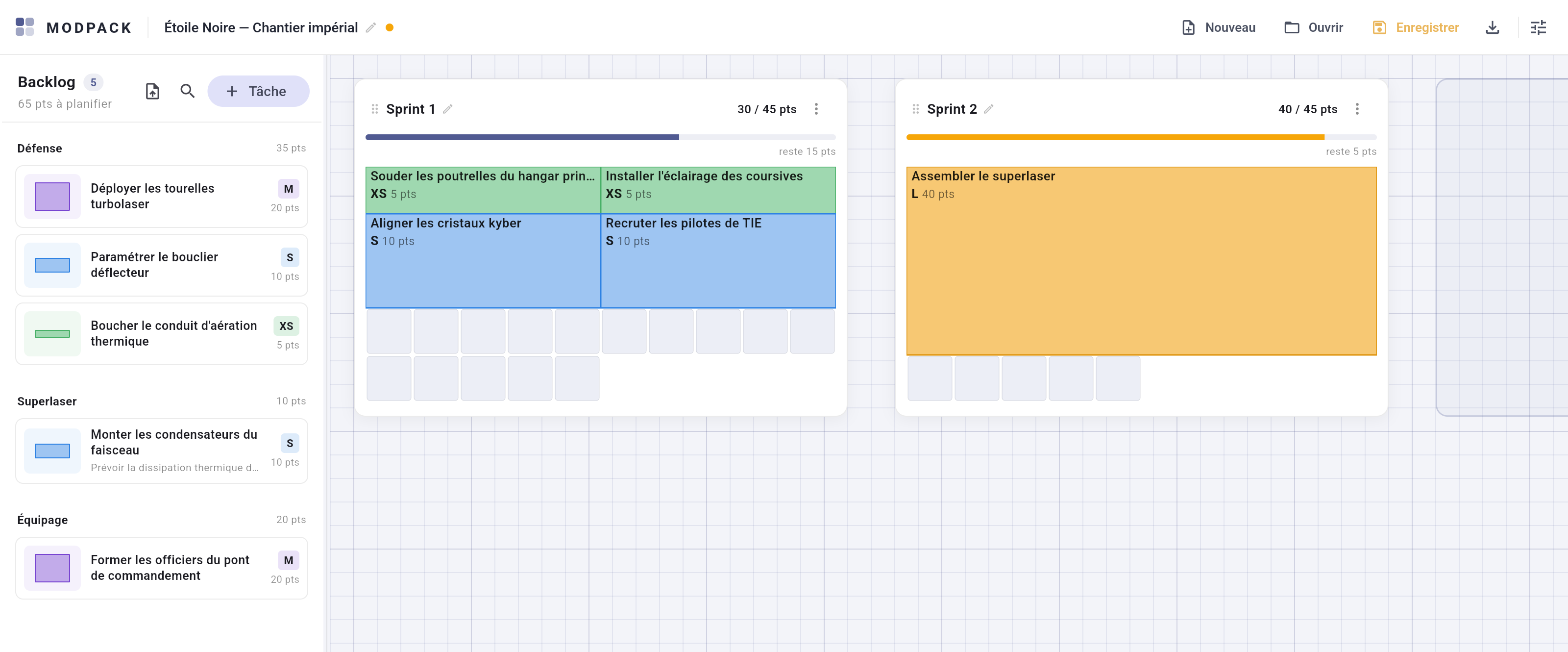
The board is an infinite gridded sheet, Miro / draw.io style: sprints are cards laid on the paper, free for you to move around.
Moving around
- Drag the board background to pan; mouse wheel to scroll, Ctrl + wheel (or pinch) to zoom from 25% to 200%.
- Three floating buttons bottom right: zoom in, zoom out, and a reset to 100% framed on your cards — you cannot get lost on an infinite sheet.
Sprint cards
- Move: grab a card by its header. It snaps to the paper's grid; two cards can never overlap (red outline = refused drop, the card returns to its place).
- Create: the "New sprint" tile previews the exact footprint of the sprint to come (automatic name, default capacity set in Settings).
- Adjust: the header renames; the card menu sets the capacity, exports the sprint as CSV or deletes it — its tasks then return to the backlog, never lost.
- Shrinking capacity below the current load is allowed: the last blocks return to the backlog one by one until the layout fits.
Dependencies between sprints
Card menu → "Dependencies…". "B depends on A" means "A finishes before B starts", drawn as a dashed arrow that follows the cards live, even mid-drag. Cycles are refused with a message.
The board as a draft
Drop a block straight onto the bare paper: it lands there, snapped to the grid, and renders exactly as it would in a grid. It can be reshaped, moved again, slid into a grid or returned to the backlog — but counts neither in a sprint nor in the backlog. Handy for "not decided yet". Overlap is tolerated there: it is a draft, not a grid.