Blocks and gestures
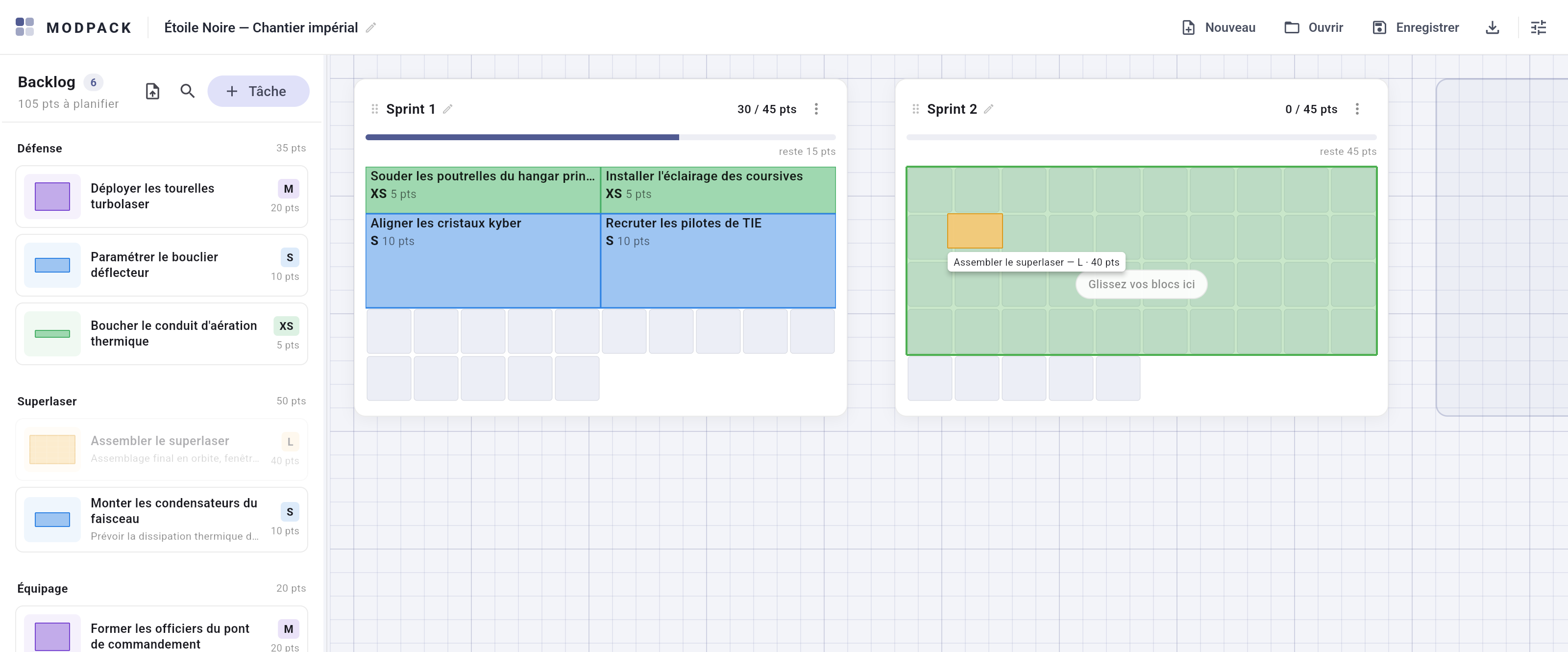
A block occupies exactly as many cells as its estimation, always in one piece. It shows the title, a size badge ("S", "M"…) and the estimation; hovering opens a full tooltip — even a one-cell piece is never mute.
Moving
- Backlog → sprint, sprint → sprint, sprint → backlog, repositioning within the same sprint, and free placement on the board: everything is a drag, from any cell of the block.
- A drop anchors at the targeted cell when possible (green preview: nothing else moves). Otherwise the grid re-arranges automatically (amber preview — the highlighted cells are where the block will land). Refused = red, nothing changes.
- Removing or moving a block never compacts the rest: holes stay, you do the tidying.
Reshaping
- Pull the right edge of a placed block to set its width, the bottom edge its height — always at constant value. If the new shape does not fit, the block stays put.
- R or ↑ while dragging rotates the silhouette (the preview follows immediately); double-click on a placed block transposes it (width ↔ height).
- The chosen shape is remembered in the file and follows the block when it moves.
Editing
- Click a block or a backlog card: the edit dialog (title, estimation, scope, description, color, dependencies, target sprint).
- Right-click: quick actions — Edit, Duplicate (the copy lands in the backlog, suffixed "(copy)"), Send back to backlog, Delete (with confirmation).
Cheat sheet
| Gesture | Effect |
|---|---|
| Drag a block | Move: backlog ↔ sprint ↔ board, or reposition within the same grid. |
| R or ↑ while dragging | Rotate the silhouette (quarter turn in Tetris). |
| Double-click a placed block | Transpose width ↔ height (rotation in Tetris). |
| Pull a block's right / bottom edge | Reshape at constant value. |
| Click a block | Edit the task. |
| Right-click a block | Quick actions: edit, duplicate, send back to backlog, delete. |
| Drag a sprint card's header | Move the card on the board (snapped to the grid). |
| Drag the board background | Pan the board. |
| Wheel / Ctrl + wheel | Scroll / zoom (25% – 200%). |
| Drag a block onto the backlog panel | Send it back to the backlog — dropping on a specific group changes its scope. |