MODPACK guide
Everything you need to get started with MODPACK, from the first dragged block to importing a full backlog. The app also ships its own walkthrough: Settings → "Tutorial" category.
Getting started
- Open app.modpack.fr (or your self-hosted instance). No account needed. The interface is available in English and French.
- Load the sample project: Settings → "Tutorial" → "Load the sample project". You get a board already filled in, so the metaphor explains itself.
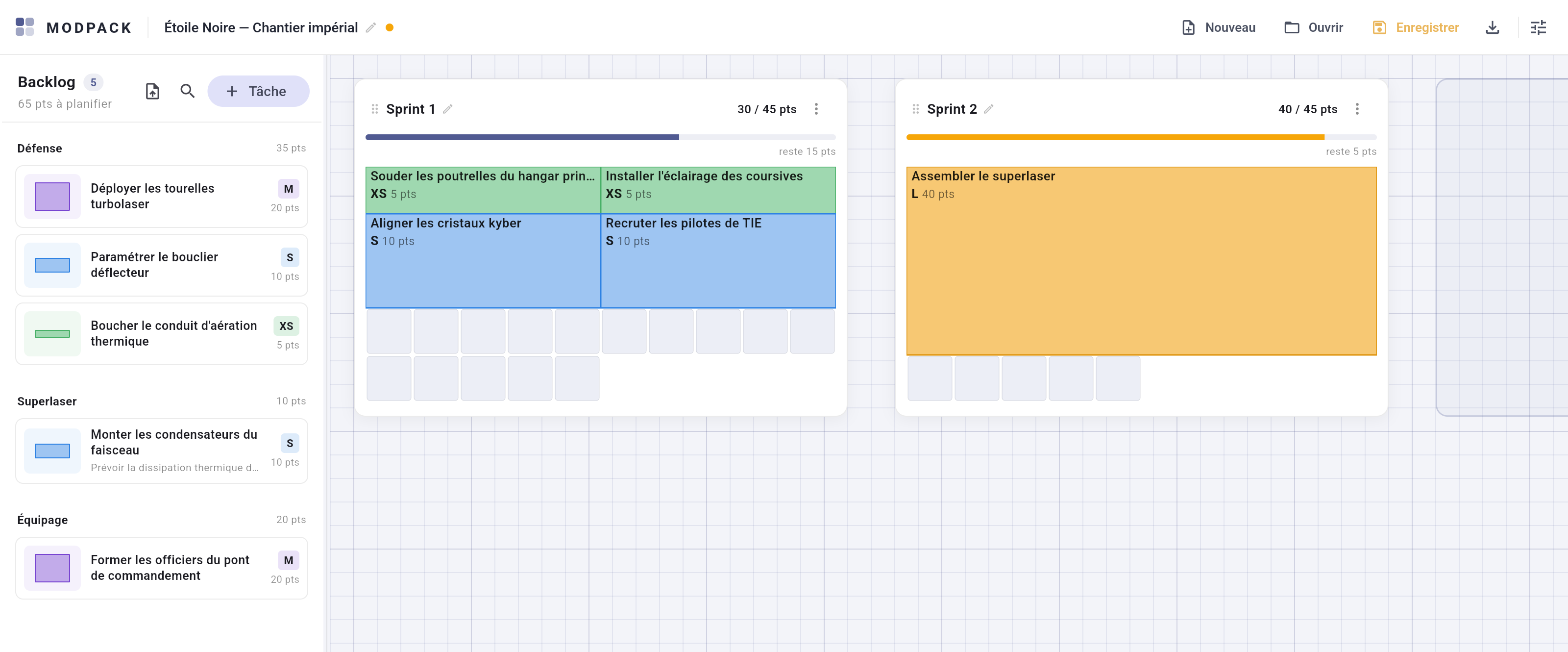
- Drag a block from the backlog (left panel) onto a sprint grid. Cells light up green (the block anchors exactly there), amber (accepted, but the grid re-arranges) or red (refused: no room).
- Read the gauge on each sprint ("43 / 50 pts") and the backlog total: what is left to plan is always visible.
- Save: the app-bar button downloads your
.modpackfile. It is your project — keep it wherever you like.
Frequently asked questions
Where is my data stored?
Nowhere but with you. The project only exists in your tab until you
save it, then in the .modpack file you download. No server
ever sees it, no telemetry is sent.
Is it really free?
Yes, no asterisk: a free product, under the MIT license, non-commercial, no ads, no premium tier. Nothing is collected, so nothing is sold.
How do we share a plan as a team?
Like a draw.io file: send the .modpack, drop it in a Git
repository or a team drive. The stable, indented JSON keeps diffs
readable in review. A real-time collaborative session (P2P, ephemeral,
still no data server) is under study.
Does MODPACK handle statuses, dates, progress?
No, by design: MODPACK is a planning tool, not an execution tracker. Dependencies exist but stay a visual signal, never a blocker.
What about Jira, Excel?
Today: CSV import/export (Excel handles it fine). A Jira connector (importing a JQL filter) is planned longer term.
What does it run on?
In the browser (web app). English and French interface, light, dark or system theme. Desktop apps (Windows/Linux) are coming — a Windows installer already exists.